FAQ
Quick answers, grouped by who's asking. New here? Start with What XPGuard is or the lights overview.
General
Is it free?
Yes. XPGuard is freeware — free for everyone.
- No paid tier.
- No license to buy.
- No ads.
Which simulators does it support?
- Pilots fly with Microsoft Flight Simulator (2020 and 2024) or X-Plane 12.
- Controllers run the plugin in EuroScope or vatSys, and drive the lights live over VATSIM.
| Role | Supported |
|---|---|
| Pilot sims | MSFS 2020, MSFS 2024, X-Plane 12 |
| Controller clients | EuroScope, vatSys |
See X-Plane setup, MSFS setup, EuroScope, and vatSys.
Pilots
I don't see any stop bars.
Work down this list:
- Connected to VATSIM? Use
xPilotfor X-Plane (swift and XSquawkBox also work),vPilotfor MSFS. Bars only light while you are online. - Below 1,000 ft AGL? Above that the plugin idles and shows nothing.
- Server reachable? With no connection XPGuard shows nothing. Check the
VATSIMandServerlines in the panel. - Is a controller online, and has anyone set a bar red? With nobody controlling, dark is normal.
- VATSIM row says
not connectedbut you are? UseForce connection(X-Plane) orForce(MSFS). - On a Mac with no
XPGuard:lines at all? macOS may have blocked the plugin. Runxattr -dr com.apple.quarantine "<X-Plane>/Resources/plugins/XPGuard"and restart. - Still nothing? The log says why. Look at
XPGuard:lines in X-Plane'sLog.txt, or theLogtab andXPGuard-MSFS.login MSFS.
MSFS check order
Check these in order:
- Connected to VATSIM.
- Below 1,000 ft AGL.
- MSFS connected (top of the app).
- The package is in your Community folder.
- A controller is online.
Why do the bars disappear when I climb?
Above 1,000 ft AGL the plugin idles by design. The bars come back near the ground.
Can I turn the lights on or off myself?
No. The controller drives them. The plugin only reflects their state.
This is true for stop bars, THL, REL and the green lead-on lines alike.
A bar is red and I can't turn it off.
You are not meant to. Pilots never switch any XPGuard light.
If a red bar never goes dark — even with the runway quiet and traffic gone — it is almost certainly a no-entry bar (ICAO 5.3.24):
- It marks an exit-only taxiway where entry is prohibited.
- It is drawn permanently red by design, in every sim. (Some are pinned red only in one visibility mode — see No-entry bars.)
- It is a property of the bar, not a state. No controller can toggle it.
Do not enter or cross it.
There's no green light — how do I know I'm cleared?
A stop bar itself is only ever red or dark — it has no green state, and THL and REL have none either. At some airports a green lead-on line lights beyond the bar when it is cleared for you; most airports have none mapped yet.
Either way, your clearance always comes verbally from ATC.
Safety
A dark stop bar, dark THL, dark REL or a lit lead-on line is an aid, not a crossing/takeoff/entry clearance. Never move without a verbal instruction from ATC.
What are the red lights down the middle of the runway?
- An automatic warning not to start your takeoff while the runway ahead is occupied or about to be crossed.
- They clear themselves when the runway is safe.
- THL going dark is not a takeoff clearance.
What is the red row of lights leading onto the runway?
- A red row from a holding position to the runway edge.
- Lit automatically when traffic makes that entrance unsafe.
- A row going dark as an aircraft passes is normal. It is still not permission to enter.
What are the green lights leading onto the runway?
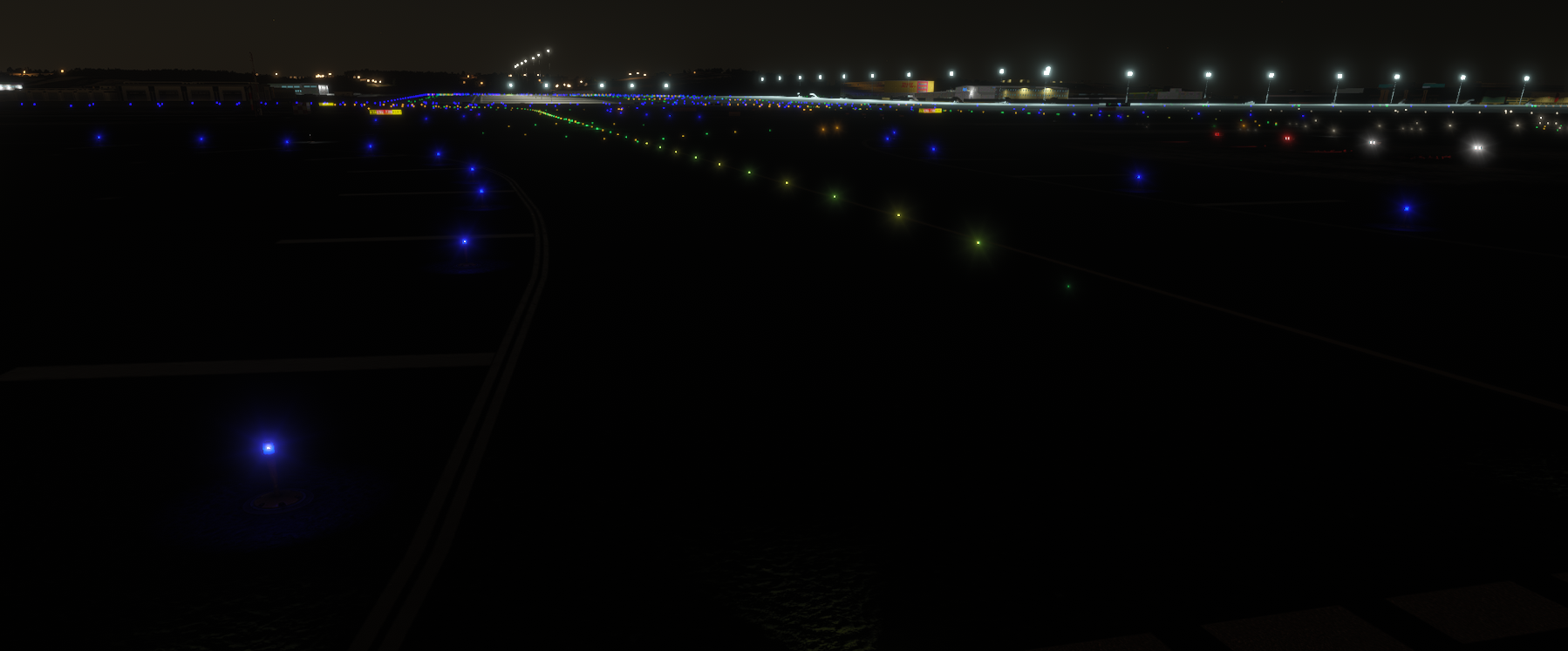
- The green taxiway centerline beyond a stop bar. It lights for the aircraft the bar was cleared for and shows the route to take.
- Some stretches alternate green and amber. That is the ILS critical area, not a fault.
- The lights go out behind you as you taxi through. Leaving the runway, green lead-off lines can light along the exits.
- With nobody controlling the runway, the lines burn as ordinary green centerline lights.
Lead-on lines exist only where volunteers have mapped them. And they are still not a clearance — that comes verbally from ATC.
A bar is in the wrong place.
Fix it near that airport:
- Open contribution mode — the
Stop bar + RELbutton in X-Plane,BAR · LEAD-ON · RELin MSFS. - Move the bar in the browser editor and submit.
- A reviewer publishes it for everyone.
See Contributing.
I see two sets of stop bars in MSFS.
Your scenery ships its own always-lit stop-bar lights, and they know nothing about VATSIM. To blank them:
- Turn on
Suppress scenery lightsin the XPGuard app. - Wait while it says
Preparing suppression files. - Restart MSFS when the app tells you to.
Works on MSFS 2020 and 2024.
Why is Auto brightness greyed out in the MSFS app?
You are on MSFS 2020. It does not report the sim's light level, so there is nothing for Auto to follow — Auto needs MSFS 2024. The manual brightness sliders still work.
What's different between MSFS 2020 and 2024?
Everything works on both, with two differences:
- Auto brightness needs 2024. MSFS 2020 does not report the sim's light level. Use the manual sliders there.
- Light spill is 2024-only. On 2020 every light always casts its ground glow pool; the point-only look and the Light spill setting do nothing there.
Controllers
How do I get and set my token?
EuroScope — nothing to copy:
- XPGuard button →
Set token(laterChange token). - A browser page opens. Sign in with VATSIM and approve.
- Done — the plugin receives its own token. Until you approve, the menu row reads
Waiting for browser sign-in.
vatSys — from the dashboard:
- Dashboard →
Controller token→Generate token→Copy. - Paste it into the
Tokenbox and clickSave.
Notes:
- Each browser-linked EuroScope machine gets its own token. Remove one under Dashboard →
Controller token→Linked devices— that signs that one plugin out. The others keep working. - Regenerating the dashboard token replaces the copy-paste token only. Linked devices are unaffected.
- No browser on the scope PC?
.xpg token <token>in EuroScope still accepts a pasted token. - Tokens identify you. Keep them private.
Why can't I claim a runway?
One of these:
- Another controller holds it. EuroScope shows their callsign and refuses the click. One controller per runway.
- Your position is not eligible for that airport — see who can claim what.
- Your account is not linked to VATSIM. Email/password accounts are refused. Sign in with VATSIM Connect.
- The callsign doesn't match the one you are connected under for that CID.
- Your token or connection failed.
Where to see the reason:
- EuroScope prints it in the message window.
- vatSys shows none. The tick clears itself a moment later.
Why did my claim drop on its own?
- A clean disconnect or unload releases claims immediately.
- The ~90 s heartbeat timeout only applies after a crash.
- Claims are also re-checked against the live VATSIM feed, even while the plugin is still running:
- Never appearing on the feed within ~5 min releases the claim and blocks new claims for ~10 min.
- A verified claim's controller leaving the feed for ~5 min releases it and blocks new claims for ~3 min.
- Reconnecting under the same callsign clears that block at once, so a genuine reconnect never locks you out.
.xpg logrecords claim events for troubleshooting.
How do I enable THL?
- Open the XPGuard menu.
- Expand the airport.
- Tick
THLon a runway row. In vatSys, tick the per-runwayTHLnode.
It then drives the lights automatically — see Takeoff Hold Lights.
Good to know:
- Available in both controller plugins. X-Plane and MSFS render it for pilots.
- THL is armed per runway, independently of the
BARclaim. - THL is itself a claim — one controller per runway.
How do I enable REL?
In EuroScope only:
- Expand the airport.
- Tick the third column,
REL, on a runway row.
The rows then light and clear themselves from live traffic. You never switch a row by hand.
A runway with no published REL geometry can't be claimed. See Runway Entrance Lights.
vatSys
REL, lead-on lights and Follow the Greens are EuroScope-only. vatSys does stop bars and THL.
How do lead-on lights work in EuroScope?
Two ways to pick the line an aircraft gets:
- Automatic — with
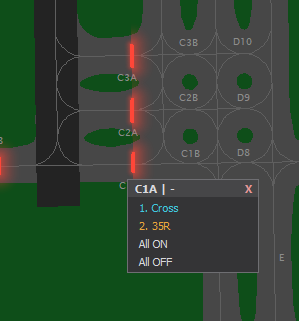
Automatic on clearanceon, clearing the bar lights the right line by itself. If nothing lights (no traffic, or no clear candidate), the pick window opens for you — click the line or its numbered button. - By hand — turn
Automatic on clearanceoff. Left-clicking a red bar that has lines puts the numbered candidates up instead of clearing it. Pick one; the pick clears the bar too.
Right-click any bar for its menu — the same numbered lines, plus All ON / All OFF.
The LEAD-ON settings section sets:
- where indicators draw —
off/main radar/mini window, - how long they stay — a number of seconds, or until the bar is red again,
- the lead-off mode (
Active Rwy/On/Off).
See Lead-on lights.
What is Auto bar, and what does * mean?
Auto barre-lights a left-click-cleared bar after a delay (default 45 s). It starts off.- A
*marks a permanent bar, set by Shift+click, thatAuto barleaves alone. - Left-click again (or pick a lead-on line at that bar) to release the pin.
- Right-click does not set permanent — it opens the bar's menu.
The menu has Lighting control panel — it says "Not open yet".
That row opens a browser lighting panel that is still in testing, so it is not open to everyone yet. EuroScope and vatSys are unaffected — keep using the plugin.
Do pilots see my changes immediately?
Near-real-time — a couple of seconds through the server.
Contributing
Do I have to map an airport from scratch?
No. Bars are detected automatically at every airport.
Contributing is fine-tuning. You fix bars that sit off the hold line, face the wrong way, are missing, or are extra. See Contributing.
An airport has bars it shouldn't. Can I remove them?
Yes. Submit an empty map to say the airport has no stop bars:
- Delete all the bars.
- Submit. The editor asks you to confirm.
- Once approved, the false bars are gone for everyone.
Will my edits change the live map right away?
No. Submitting creates a separate proposal. Nothing in the sim changes until a reviewer approves it.
- On approval: it replaces the published map and reaches the sim on the plugins' next poll (no restart).
- On rejection: the live map is untouched. The reason reaches your dashboard and inbox.
Who reviews my submission?
The XPGuard team and community moderators. A moderator reviews their own countries' airports only.
Review is bar-by-bar:
- A reviewer can accept, reject, or edit each bar.
- So the published map can differ slightly from what you sent, with a note telling you where and why.
- Track it under Dashboard →
Contributions.
Do I need to map THL, REL or lead-on separately?
- THL is worked out from the runway and needs no contribution.
- REL rows are mapped by volunteers, entrance by entrance, in the same editor under the
RELtab — separate from the stop bars. See Mapping REL rows. - Lead-on lines are mapped too, per bar, under the
Lead-Ontab. Each line covers one onward path and is assigned the runway it leads onto (orCrossfor one that only crosses). See Contributing.
My lead-on line has a VERIFY badge and doesn't light in the sim.
The line was copied over from another map, so its shape is that scenery's — nothing lights along it until it is fitted here. Drag its points onto your map's pavement; the badge clears and the line is served.
Can I map an add-on scenery?
Yes, but only from inside the sim (contribution mode), so XPGuard can attach your map to the right scenery.
The Base map (built-in airport) can also be edited from the dashboard in a browser. See Scenery & publisher.
Still stuck?
Report bugs, request features and ask questions on Discord — it is the support channel.